AntiBleed — mic bleed automixer
Every mic hears
everyone.
AntiBleed keeps only the one that's talking.
A gain-sharing automixer plug-in that removes microphone bleed from multi-mic podcasts, interviews and panels. Put one instance on each mic track — they compare levels in real time and turn down the mics that only hear bleed.
VST3 / AU on macOS 12+ · VST3 on Windows 10+ · 14 days free, no signup
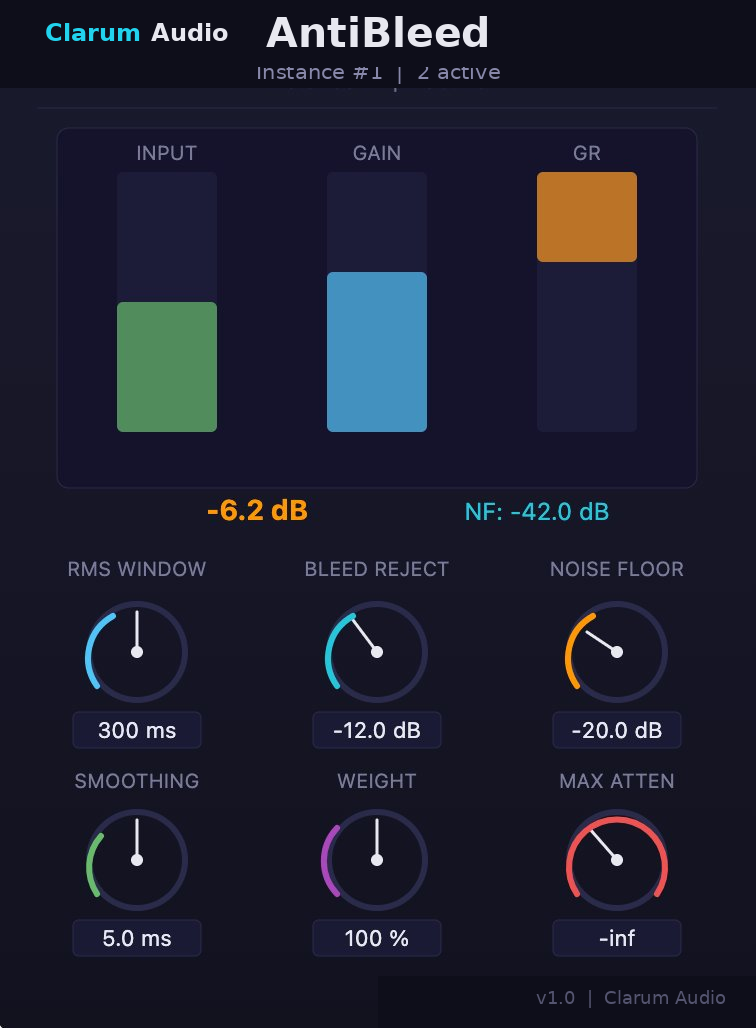
- Channels
- Up to 16 mics
- Latency
- Zero, no look-ahead
- License
- $69 once, two computers
Hear the difference
Same session. Before and after.
A multi-mic recording, first raw, then with AntiBleed on every track. Switch between them while it plays.
Without AntiBleed: the raw multi-mic recording. Every mic hears every voice.
Before — raw multi-mic recording
After — with AntiBleed on every track
How it works
Three steps. Nothing to configure.
-
01
Insert on every mic track
Add AntiBleed as an insert on each microphone track. Instances find each other automatically.
-
02
Instances compare levels
The gain-sharing algorithm compares all channels in real time and works out which mic has the active speaker.
-
03
Bleed comes down
Mics that only hear bleed are turned down smoothly. No pumping, no artifacts — just separated dialogue.
Why a gate can't do this: Mic bleed vs noise gate vs automixer. Before you record: Mic placement for a two-person podcast.
Features
Built for real-world dialogue.
- Bleed rejection
- Goes beyond standard automixing: compares channel levels and pushes down mics that are only picking up bleed.
- Gain-sharing
- Distributes gain across all active mics for natural transitions between speakers.
- Up to 16 channels
- From a two-person interview to a full panel. Every instance talks to the others in real time.
- Zero latency
- No look-ahead buffer, no delay. Safe for live monitoring and broadcast.
- Per-channel weight
- Give a quieter speaker priority without changing the overall balance.
- Adjustable noise floor
- Set the threshold for silence so room tone never opens a mic that should stay down.
Works in
DaVinci Resolve (Fairlight) · Logic Pro · Reaper · Cubase · Nuendo · Ableton Live · Studio One · FL Studio · Adobe Audition — any VST3 or AU host
Pricing and free trial
License
$69
One-time payment, lifetime license.
- VST3 & AU on macOS · VST3 on Windows
- Intel & Apple Silicon native
- Up to 16 simultaneous channels
- Two computers per license
- Free updates for life
Try it first
14 days. Full features. No limits.
No credit card, no signup, no watermarks. Install it and put it on your next session.
FAQ
Questions, answered.
What is mic bleed?
When recording with multiple microphones in the same room, each mic picks up not only its intended speaker but also voices from other speakers. This unwanted sound is called mic bleed. It makes your mix sound muddy and echoey.
How is AntiBleed different from a noise gate?
A noise gate simply mutes a channel below a threshold, creating abrupt cuts. AntiBleed uses intelligent gain-sharing — it smoothly distributes gain across all channels, so transitions between speakers sound natural. Longer write-up: Mic bleed vs noise gate vs automixer.
Does it work with DaVinci Resolve?
Yes. AntiBleed is designed and tested for Fairlight in DaVinci Resolve Studio. It also works in any DAW that supports VST3 or Audio Units. Note: DaVinci Resolve Studio (paid) is required for VST3 support.
How many microphones can I use?
Up to 16 channels simultaneously. Each microphone track gets its own plugin instance. The instances automatically detect each other and share level data in real time.
How do I render or bounce tracks with AntiBleed?
AntiBleed instances share level data with each other in real time, so they all need to be running during a render. Rendering a single track in isolation won't work, because the other instances aren't active. Instead, route your other mic tracks to a bus, mute that bus, and render through the master — every instance stays active, but only the track you want ends up in the output.
What platforms are supported?
macOS 12 (Monterey) and later, including Apple Silicon (M1/M2/M3/M4) and Intel, available as VST3 and Audio Units. Windows 10 (64-bit) and later, available as VST3.
Does it work in Pro Tools?
Not yet. Pro Tools requires the AAX plugin format, and AntiBleed is currently VST3 and Audio Units only. An AAX version is on our roadmap. Contact us at support@clarumaudio.com and we'll let you know when it's available.
How many computers can I use one license on?
Two. A single license activates AntiBleed on up to two machines, so you can run it on a studio workstation and a laptop.
Is there a free trial?
Yes. Download the free 14-day trial to test AntiBleed in your projects. No credit card required. The trial is fully functional with no limitations and no watermarks.
Does AntiBleed work on drums or music recordings?
AntiBleed is designed and tested for dialogue — podcasts, interviews, panels, and film dialogue. The gain-sharing principle could work on drum kits or live music multi-mic setups in theory, but those use cases haven't been tested yet. If you try it there, let me know how it goes.
Contact
Get in touch.
A question, a session that won't behave, or feedback — write and I'll answer.